I tried to install the PCSGU250 on my Samsung N120 running Windows XP. I tried the newest driver from
your website, but after plugging in win xp told me always that it wants to install a driver!
on the second installation run it told me that the device could not be installed.
Did you first try to install the driver in the CD folder PCSGU250Driver ?
What was the problem in this case - did the XP request again to install the driver when the USB cable was disconnected and reconnected?
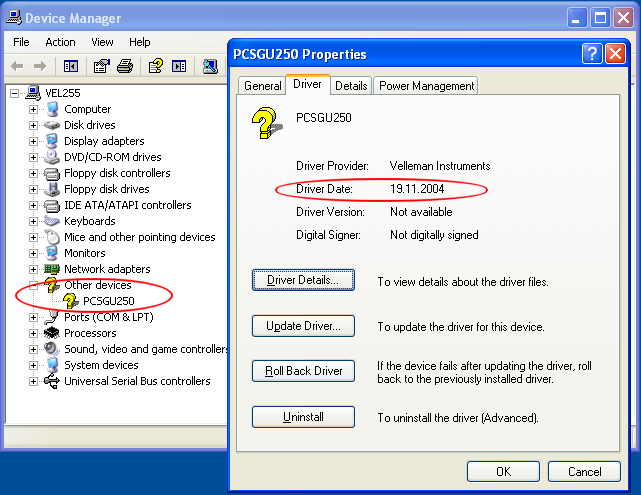
Can you check in the Device Manager the driver problem…?
I first installed the driver from disc in the folder PCSGU250Driver. win xp asked me a 2nd time to install a driver (I chosed the same folder), but did not work. my next try was to choose the winusb driver from cd. same procedure (win asked me 2 times).
the device manager shows that there is a problem with that device and I should reinstall the driver again.
Sorry, no other service pack for the PCSGU250 is available.
It is very strange that none of the drivers you have installed is working.
You may try this driver for Windows 98SE (works also with XP).
Here is a link to download the driver: box.net/shared/5efzpyc3pr
Here is what you should see in the Device Manager when this driver is installed: